

IN THIS ARTICLE:
Key Takeaways
1
Claude Meta Ads integration via official MCP takes under 5 minutes. No developer credentials needed.
2
Meta's 29 MCP tools cover everything from creative fatigue to signal quality and audience diagnostics.
3
New campaigns created through Claude are paused by default; nothing goes live without your approval.
4
Creative fatigue is Meta's biggest ROAS killer. Claude surfaces it before it shows up in numbers.
5
Claude identifies what's underperforming, but strategic decisions on why still require human expertise.
Claude for Meta Ads became significantly more practical on April 29, 2026, the day Meta launched its official Ads AI Connectors in open beta.
For the first time, marketers could connect Claude directly to their Facebook and Instagram ad accounts through a Meta-sanctioned integration, without a developer app, API tokens, or third-party intermediaries.
The result is a live connection that turns plain English questions into real-time account analysis.
This guide covers the exact setup process, what the 29 tools Meta exposed actually do, the prompts worth running immediately, and where the integration hits its ceiling, which is where strategy has to take over.
What Claude Meta Ads Integration Does And Why It Changed in 2026
Claude for Meta Ads works differently now than it did six months ago. Before Meta's official MCP launch, every Claude integration with Meta Ads required a third-party connector, paying for a wrapper that accessed the Marketing API with varying degrees of reliability and account safety.
Marketers using unofficial browser automation risked account suspension. Even legitimate connectors added latency, token overhead, and a third party in the data path.
The April 2026 launch changed that. Meta's official MCP server is the first time the company has directly opened its ad infrastructure to external AI clients. Authentication runs through the same Meta Business OAuth screen you already use. This means the account ban risk that kept cautious teams on the sidelines is officially gone.
For B2B SaaS teams that are already using AI for Google Ads to compress reporting and surface diagnostics, this brings Meta to the same level of operational integration.
The two platforms serve different roles in a full-funnel system. Google and Meta work differently against the funnel, and the Claude integration for each reflects that. Google is about capturing existing demand. Meta, especially at the top of the funnel, is about creating it.
Set up: Connect Claude to Meta Ads in 5 Minutes
This is the fastest setup in the Claude MCP ecosystem. No terminal commands, no config files, no Python environment.
Method 1: Claude.ai (Simplest)
Go to claude.ai → Settings → Integrations
Search for Meta Ads in the integrations directory
Click Connect. This redirects to Meta's Business OAuth screen
Log in with the Facebook account that has admin access to your ad account
Approve the requested permissions
Return to Claude. The integration is live
Verify with this prompt: "List all active campaigns in my Meta Ads account." If it returns campaign names and status, you're connected.
Method 2: Claude Desktop (MCP Config)
Add the server block to your Claude Desktop config file:
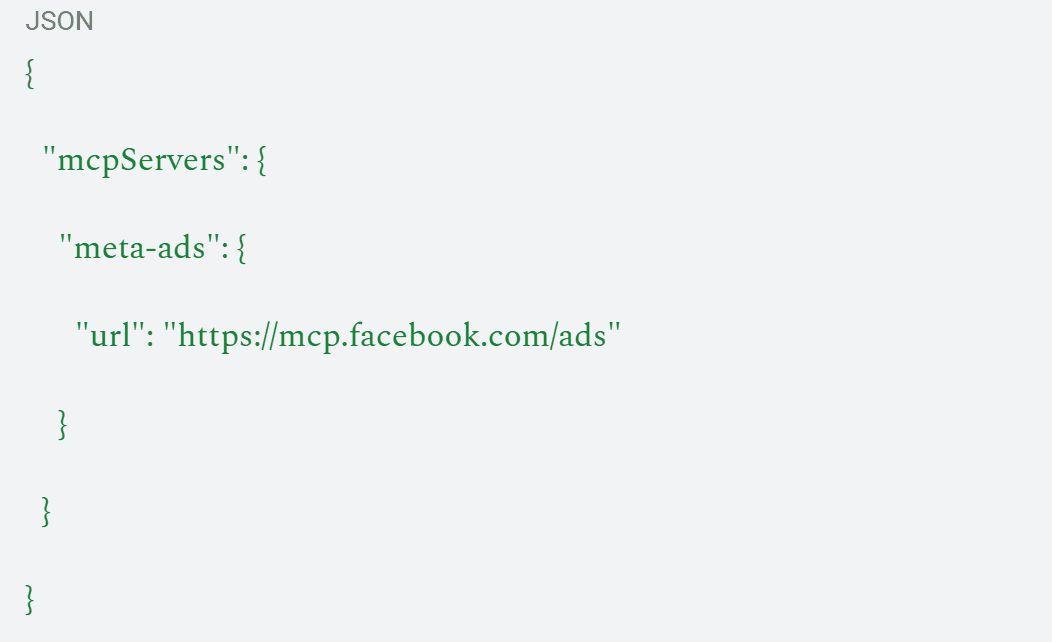
Restart Claude Desktop and authenticate via the OAuth prompt that appears on first use.
Key things to know before you start:
Detail | Specifics |
Cost | Free during open beta |
Claude's plan required | Pro, Max, or Team. Free tier doesn't support MCP |
Platforms covered | Facebook, Instagram, Messenger, Audience Network |
New campaign status | Paused by default. Nothing goes live automatically |
Write access | Yes, included from day one |
Account ban risk | None. Officially sanctioned integration |
The 29 Tools: What They Actually Cover
Meta shipped 29 tools across five capability areas. Understanding what's in each bucket tells you what Claude can and can't do without a workaround.
Category | Tools | What You Can Do |
Insights & Performance | 7 | Query campaign metrics, ad-level performance, placement breakdowns, and date-range comparisons |
Campaign Creation & Management | 5 | Create campaigns, ad sets, and ads (all paused); update budgets, schedules, and targeting |
Dataset Quality & Diagnostics | 4 | Signal quality scores, pixel health, conversion event match rates, attribution diagnostics |
Accounts, Pages & Assets | 3 | List ad accounts, connected pages, and available creative assets |
Product Catalog | 10 | Catalog management, product set creation, feed diagnostics, DPA campaign setup |
The Dataset Quality & Diagnostics tools are the most underused. Signal quality directly affects how well Meta's algorithm can find your audience. A degraded pixel or low event match rate means the algorithm is working with less data, which inflates CPMs and reduces targeting precision. Claude can surface this in 30 seconds. Most teams never check it manually.
Best Claude Prompts for Meta Ads: By Use Case
These are the prompts I'd run first on any connected account.
Use Case | Prompt | What You Get Back |
Account audit | "Run a full account review. Summarize CTR, CPM, ROAS, and frequency across all active campaigns. Flag anything outside normal range." | Account health snapshot with outliers isolated |
Creative fatigue | "Check CTR trends per ad over the last 7, 14, and 30 days. Flag any creative where CTR has declined more than 20% week-over-week." | Refresh the shortlist before ROAS drops |
Frequency alert | "List all ad sets with frequency above 3.0. Sort by spend." | Saturation signal before CPMs spike |
Audience overlap | "Identify ad sets where audience targeting overlaps significantly. Flag any competing for the same users." | Cannibalization identified and quantifiable |
Signal quality | "Check pixel health and event match rates across all conversion events. Flag anything below 7.0 match quality score." | Attribution accuracy baseline |
Placement breakdown | "Compare CPA and ROAS by placement — Feed, Reels, Stories, Audience Network. Flag placements where CPA is more than 2x account average." | Budget reallocation inputs |
Weekly report | "Generate a weekly Meta Ads performance summary with WoW deltas, top and bottom performers, and three recommended actions." | Stakeholder-ready report in 60 seconds |
Budget pacing | "Check daily spend vs. daily budget target across all active ad sets. Flag anything pacing above 130% or below 70%." | Spend control without daily dashboard checks |
For the full library of Claude marketing skills covering both Meta and Google, including copy-paste prompts for pipeline reporting and ICP-based ad copy generation, the guide covers the broader workflow.
What Claude Does Well on Meta Ads
Creative fatigue diagnosis.
Meta's biggest ROAS killer is running the same creative past the point where the audience is responsive.
By the time frequency and CPM numbers degrade visibly in a dashboard, you've already lost two weeks of efficiency. Claude catches the CTR trend before it shows up in ROAS.
Attribution diagnostics.
Low pixel event match rates silently degrade campaign performance for months without triggering any alert. The Dataset Quality tools surface this instantly.
B2B teams dealing with attribution complexity across long sales cycles should run the signal quality check as one of the first queries on any new account.
Reporting compression.
A weekly performance summary with WoW deltas, placement breakdowns, and recommended actions that would take 90 minutes to compile manually takes 60 seconds with Claude connected. That time compounds over a quarter.
Where Claude Hits the Ceiling: Limitations
Claude identifies what's wrong. It doesn't tell you why, and on Meta, the why matters enormously.
A frequency of 4.2 on a campaign could mean the creative is exhausted, the audience is too narrow, the campaign has been running too long without a refresh, or the product-market fit isn't strong enough for this audience to convert at all.
Four different diagnoses, four different responses.
Claude returns the number, but determining the cause requires someone who understands the account history, the creative strategy, the audience architecture, and what Meta's algorithm has been doing in your vertical.
The same applies to budget decisions. Claude can tell you three ad sets are underpacing, and one is burning at 150% of the daily budget.
What it cannot tell you is how the overpacing campaign is converting unusually well. It also cannot answer whether the extra spend is profitable, and if the bidding misconfiguration is burning budget without producing results.
That judgment layer is what separates faster diagnostics from better outcomes.
The Bottom Line
Claude for Meta Ads is now the most accessible it's ever been: A five-minute OAuth connection, 29 official tools, free during beta, and no account risk.
For any team spending on Facebook and Instagram, getting this connected is worth the setup time immediately. The creative fatigue detection alone pays for itself in the first week on most accounts.
What it doesn't give you is a strategy. Meta Ads operates on creative cycles, audience decay curves, and CPM dynamics that require human judgment to navigate, particularly for B2B SaaS companies where the buying cycle and deal size make every misallocated dollar matter more.
ScalixAI manages Meta Ads and Google Ads end-to-end for B2B SaaS and AI companies, connecting both channels to CRM pipeline data, building the attribution layer that makes performance visible at the revenue level, and making the decisions that the diagnostic tools can't make on their own.
If you want to know what your Meta Ads spend should actually be producing, our Google Ads and paid media management for B2B companies is where that conversation starts.
Meta Ads Connected. Now Make Sure They're Actually Working.
ScalixAI audits your Meta Ads setup against your pipeline targets and shows you exactly where the gap is: creative, audience, attribution, or structure.
Book Your Free Audit →
Is Meta's official MCP free to use?
Will this get my Meta ad account suspended?
Does it cover Instagram ads as well as Facebook?
Can Claude make changes to my live campaigns?
How is this different from using Claude with a CSV export?