Your Campaigns Are Generating Data. Are You Generating Revenue?
OpenClaw tells you what's happening. ScalixAI tells you what to do about it — and does it.
Share this Article


Key takeaways
OpenClaw Telegram setup takes under 20 minutes and works on any device instantly.
Telegram's bot infrastructure makes OpenClaw more reliable than WhatsApp for scheduled skill runs.
Skills surface data fast, but campaign decisions still require context that the agent doesn't have.
A YC-backed B2B SaaS client generated $1M+ in closed-won revenue with a proper paid media strategy, not through OpenClaw Telegram setup.
ScalixAI manages the full stack, skills, MCP, attribution, and decisions, not just the toolinga.
OpenClaw on Telegram puts your entire paid media operation inside a chat window. Whether you need to send a message or get a campaign audit back in 30 seconds, by connecting OpenClaw to Telegram, you deal with no dashboards, no CSV export, no context-switching between tabs.
I've been running it this way across Google Ads and Meta Ads accounts, and it genuinely changes how fast you can spot problems. That said, speed isn't the same as judgment.
This guide covers exactly how to connect OpenClaw to Telegram. It talks about what you can realistically do with it, and it’s limitation.
What Is OpenClaw on Telegram?
OpenClaw is an open-source AI agent that connects to Google Ads and Meta Ads via MCP, a direct API layer that lets the agent pull real platform data without browser automation or manual exports.
Telegram is one of two messaging channels it supports, alongside WhatsApp.
The difference between the two matters operationally.
WhatsApp requires QR code linking through a physical device. Telegram uses a bot token, a string you generate once from BotFather and paste into a config file. That makes Telegram easier to run on a VPS, more stable for scheduled skill runs, and simpler to maintain long-term.
If you're building a paid media monitoring setup that runs on a schedule without manual intervention, Telegram is the better choice.
Learn the steps for WhatsApp OpenClaw setup here ->
How to Set Up OpenClaw on Telegram (Step-by-Step)
Setup time: 15–20 minutes.
Requires OpenClaw already installed and at least one MCP connection (Google Ads or Meta Ads) configured.
If you're starting from scratch, the OpenClaw for Google Ads guide covers the full initial setup.
Step 1 — Create a Telegram Bot
Open Telegram and search for @BotFather. Send /newbot, follow the prompts to name your bot, and copy the API token it returns.
It looks like: 123456789:ABCdefGhIJKlmNoPQRstuVWXyz.
Step 2 — Add the Token to OpenClaw Config
Edit ~/.openclaw/openclaw.json and add the Telegram channel block:

Get your Telegram user ID by messaging @userinfobot in Telegram.
Paste the returned numeric ID into allowed_users. This locks the bot so only you can trigger it.
Step 3 — Restart OpenClaw and Test

Open Telegram, find your bot, and send /start.
If the bot replies with a skill list, the connection is live.
Send "run a Google Ads audit" to confirm your MCP link is returning real data.
Step 4 — Load Your Skills
Drop .md skill files into ~/.openclaw/workspace/skills/. The full list of recommended paid media skills is in the OpenClaw skills for paid media guide — covers Google Ads and Meta Ads with trigger phrases for each.
Step 5 — Set Up Scheduled Runs (Optional but Recommended)
Add cron jobs for skills you want running automatically:
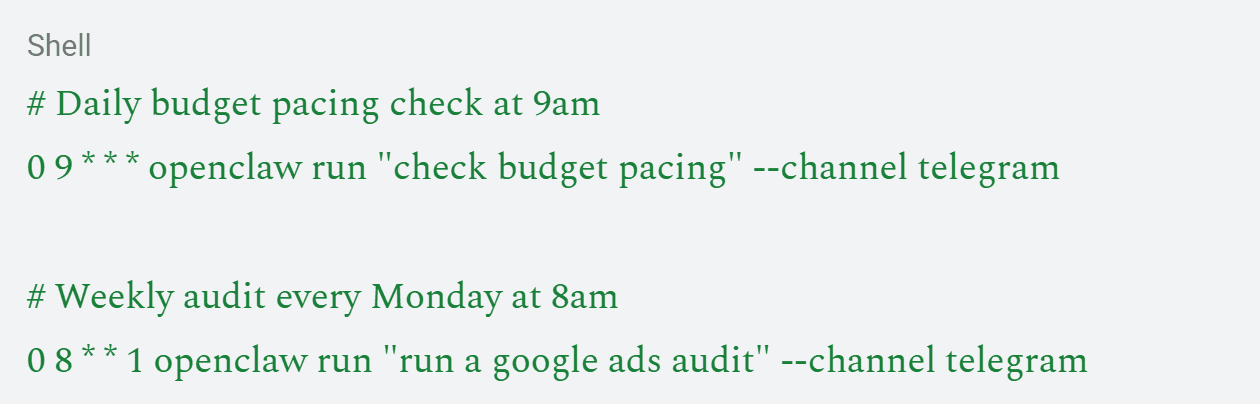
Results land in your Telegram chat without you having to ask. That's the real value of Telegram over WhatsApp for scheduled monitoring.
What You Can Do With OpenClaw on Telegram
Once connected, every skill in your library is available as a plain-text message. Here's how the core use cases map to real paid media tasks:
[table]
Use Case | Telegram Message | What Comes Back
Campaign health check | "Run a Google Ads audit." | CTR, CPC, conversion rate, impression share, and budget pacing across all campaigns
Creative fatigue (Meta) | "Check creative fatigue." | CTR trend per ad over 7/14/30 days, flagged creatives with declining performance
Wasted spend | "scan wasted spend." | Low-converting search terms, irrelevant placements, and budget leaks
Quality score diagnostic | "Check quality scores." | Keyword-level QS data, below-7 flags, landing page, and relevance issues
Budget pacing | "Check budget pacing." | Over/under-pacing campaigns flagged before they hit limits
Weekly report | "weekly report" | Structured summary with WoW deltas, benchmarks, and action items
Frequency alert (Meta) | "check frequency" | Ad sets above 3.0 frequency flagged for creative refresh
Competitor overlap | "competitor overlap" | Auction insights shows which competitors appear alongside your ads and at what rate
[/table]
For a deeper breakdown of how each skill works and when to run it, the OpenClaw Meta Ads post covers the Meta-specific stack in detail.
Real Example: Budget Pacing on a Live Google Ads Account
Here's what a typical Telegram interaction looks like in practice.
You're out of the office on a Tuesday. At 9 am, the scheduled budget pacing skill runs automatically and drops this into your Telegram:
Budget Pacing Report — Tuesday 9:00 am ⚠️ Campaign: "Brand — Exact" — pacing 140% of daily budget. On track to exhaust by 2 pm. ✅ Campaign: "Non-Brand — BOFU" — pacing normally. ⚠️ Campaign: "Competitor — Intercept" — pacing 58%. Check bid caps and ad scheduling.
That's a real problem caught early. The Brand campaign burning out by 2 pm means you lose afternoon traffic, exactly when conversion rates are often highest. Without this alert, you'd find out the next morning when you pull the dashboard manually.
That's the convenience argument for OpenClaw on Telegram in one example. The tool does its job.
Where OpenClaw on Telegram Falls Short
I want to be direct about this. OpenClaw on Telegram is fast at surfacing data. It's not fast at surfacing the right response to that data.
Take the budget pacing example above. The Brand campaign pacing at 140% could mean three different things depending on context:
- A competitor just started bidding aggressively on your brand terms. You need to increase the budget and protect the share.
- Your bid strategy is misconfigured after a recent change and is accelerating spend unnecessarily.
- Conversion rates are unusually high today, and the additional spend is profitable. Do nothing.
OpenClaw can tell you the campaign is overpacing. It cannot tell you which of those three situations you're in, or what to do about it. That call requires someone who knows the account history, the competitive landscape, the bid strategy logic, and what happened in the account last week.
Understanding how Google Ads actually works, from the auction mechanics, Quality Score dynamics, to bidding algorithm behavior, is what separates a useful diagnostic from a useful decision.
The same gap exists on Meta. A Frequency Alert flagging 3.5 frequency on a campaign is useful data. Whether you kill the ad set, refresh creative, expand the audience, or hold because a product launch is next week will reset engagement. Now that's a judgment call. The .md file doesn't have that context.
When Strategy Matters More Than Tooling
One of the clearest examples of this gap I've seen was with a YC-backed B2B SaaS company. They came in with a Google Ads account that was running. It was technically functional, data was available, and campaigns were live. The problem wasn't visibility into performance. It was that the account was structured around the wrong objectives.
They were running Performance Max heavy with blended branded and non-branded traffic, masking structural inefficiencies. The data was accessible. The interpretation was wrong.
After rebuilding the account architecture, separating branded from non-branded, prioritizing deal-stage keywords aligned with buyer readiness, and layering geo-based bidding informed by pipeline data, the results were: $1M+ in closed-won revenue and $7M+ in attributed pipeline in under six months.
No amount of Telegram alerts on the original account structure would have produced that outcome. The tool wasn't the problem. The strategy was. That's the distinction that matters.
OpenClaw Telegram vs. WhatsApp: Which Should You Use?
[table]
| Telegram | WhatsApp
Setup method | Bot token (config file) | QR code scan (physical device)
VPS compatibility | Full. No device dependency | Limited. Requires a linked device online
Scheduled skill runs | Reliable via cron | Can break if the phone loses connection
Multi-device access | Native. Works on all devices | Requires the primary device to be online
Setup time | ~15 minutes | ~10 minutes
Best for | Automated monitoring, VPS deployments | Quick manual queries, existing WhatsApp users
[/table]
If you're running OpenClaw on a VPS with scheduled tasks, use Telegram.
If you already have WhatsApp linked and just want quick manual skill runs, either works.
For teams managing multiple accounts with overnight monitoring, Telegram is more dependable.
ScalixAI vs. Self-Hosting OpenClaw on Telegram
OpenClaw on Telegram is a legitimate productivity tool for paid media management. I use it. It's worth setting up. But here's the honest version of what it gives you versus what a managed service gives you:
[table]
| Self-Hosting OpenClaw on Telegram | ScalixAI Managed Service
Data access | Fast, via scheduled skills | Handled with human interpretation
Diagnostic speed | 30 seconds per skill | Same plus strategic context
Campaign decisions | Yours to make with raw data | Made by an ex-Googler with $1B+ spend managed
Attribution setup | Not included | Included. CRM-connected pipeline reporting.
Account strategy | Not included | Included
Maintenance | API updates, token rotation, skill fixes | Handled
Best for | Technical operators, developers, agencies | Growth-stage B2B SaaS, lean marketing teams
[/table]
If you're evaluating your options against what other performance marketing agencies provide, the comparison isn't OpenClaw vs. ScalixAI, it's whether you want a diagnostic tool or a managed growth system.
The Bottom Line
OpenClaw on Telegram is one of the most practical setups in the OpenClaw ecosystem. It is more stable than WhatsApp for automation, faster to deploy on a VPS, and genuinely useful for catching paid media problems before they compound.
If you're running Google Ads or Meta Ads and spending more than a few hours a week on manual reporting, the setup time is worth it.
OpenClaw skills for paid media surface the data. Telegram delivers it cleanly. The gap, however, is between having the data and knowing what to do with it at the account, competitive, and business strategy level.
That's what ScalixAI is built for. We manage Google Ads and Meta Ads end-to-end for B2B SaaS and AI companies. We offer services for strategy, architecture, optimization, and attribution, not just the diagnostic layer.
If your paid media should be generating more pipeline than it is, start with our Google Ads management for B2B companies, and we'll show you exactly where the gap is.
.gif)