Revenue looks flat even with connectors running?
We'll show you what the data is missing.
Share this Article



Key takeaways
Claude MCP connectors give Claude live API access. Not static exports or scraped data.
OAuth 2.0 is the standard auth pattern. Token refresh handling is what separates stable from broken.
Meta's official MCP launched in April 2026 with 29 tools. It is the safest Meta connection available today.
Google's official MCP server is read-only. It cannot modify bids, budgets, or campaign settings.
Multi-platform connector architecture requires understanding scope isolation. One bad token affects all.
Claude MCP connectors are what turn Claude from a general-purpose AI into a live ad management tool. Understanding how they're built, authenticated, and scoped is what separates a reliable setup from one that breaks silently after two weeks.
This guide covers the technical foundation of MCP connections, and the three ad platform connectors worth running for paid media in 2026: Google Ads, Meta Ads, and LinkedIn Ads. It also covers the authentication patterns that keep each one stable.
If you've already been through individual setup guides, this is the layer underneath those: how the protocol actually works, why connectors fail, and what the right architecture looks like across multiple platforms.
What Claude MCP Connectors Actually Are, And How the Protocol Works
Claude MCP connectors are the implementation layer for the Model Context Protocol, an open standard developed by Anthropic that defines how AI models discover, authenticate, and call external tools.
Think of MCP as a universal adapter specification. The connector is the specific adapter built for a given platform.
When you add a connector to Claude, you're pointing Claude at an MCP server, a process running somewhere (locally, on a VPS, or hosted by a third party) that exposes a set of tools.
Claude discovers those tools automatically, learns what they do from their descriptions, and calls them when your prompt requires it.
You ask, "Which campaigns are overpacing budget?" Claude calls the MCP server. The server pulls the answer from Google Ads using your credentials. Claude sends it back as a readable response.
The chain has four components:
- Claude (the AI client)
- The MCP server (the middleware)
- The platform API (Google/Meta/LinkedIn)
- Your credentials (OAuth tokens or API keys)
Understanding where each failure mode lives is what makes debugging fast.
For a practical overview of which connector fits which use case, the best Claude connectors for ad management comparison covers the full landscape, including Zapier, Composio, and Porter Metrics.
Google Ads MCP Connector: Official Setup
Google shipped its official MCP server for Google Ads in October 2025. It's open-source, maintained by Google's Marketing Solutions team, and available at github.com/googleads/google-ads-mcp-server.
Technical requirements:
- Python 3.10+
- Google Ads Developer Token (apply via Ads API Center. The standard access takes 1–2 business days)
- Google Cloud project with OAuth 2.0 credentials (Desktop App type)
- Claude Desktop (Pro plan or above)
Authentication flow:

Configure google-ads.yaml:
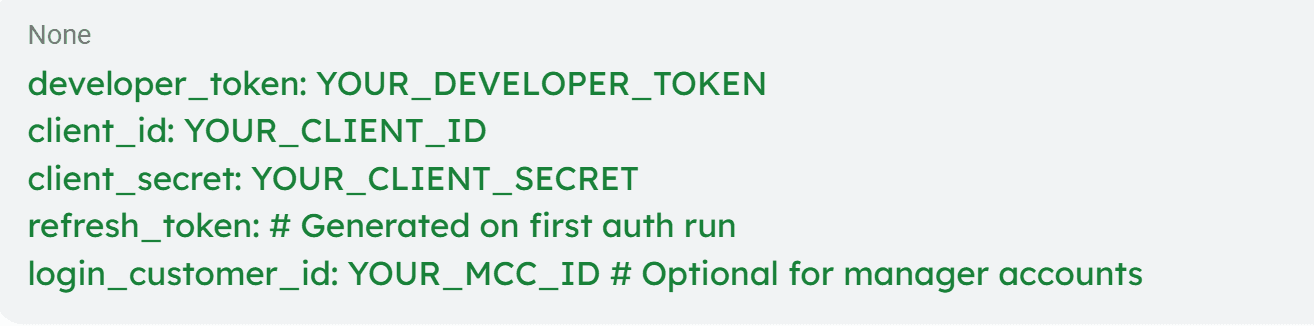
Run python authenticate.py to generate the refresh token via browser OAuth. Add the server path to Claude Desktop's claude_desktop_config.json:
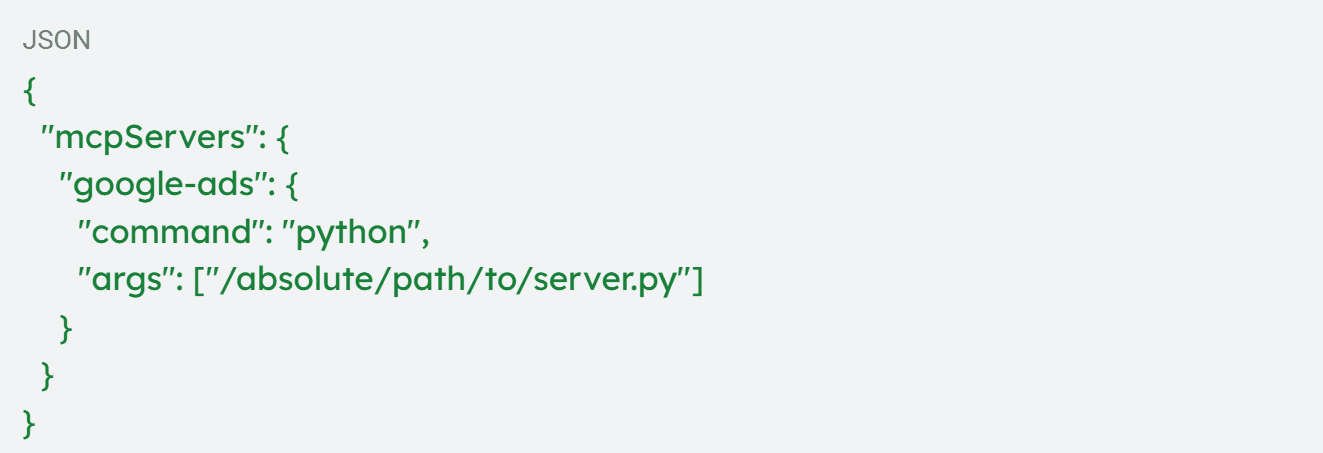
It exposes two core tools:
- List_accessible_customers (returns account list)
- Search (runs GAQL queries against any accessible account)
The entire Google Ads reporting layer collapses to these two calls, which are intentionally minimal. Read-only version. There are no bid changes, no budget modifications, and no campaign edits.
Token rotation: Refresh tokens expire after 6 months of inactivity. Set a calendar reminder or use a service account with domain-wide delegation for agency setups managing multiple client accounts; it handles rotation automatically.
The full step-by-step setup with verification commands and common error fixes is in the connect Claude to Google Ads MCP guide.
Meta Ads MCP Connector: Official Setup
Meta launched its official Ads AI Connectors on April 29, 2026. It is an MCP server at mcp.facebook.com/ads with 29 tools across five capability categories. It's also the fastest setup in the paid media MCP ecosystem and the safest from an account security standpoint.
Technical requirements:
- Claude Pro plan or above
- Meta Business Suite admin access
- No developer app, no API tokens, no terminal commands
Setup (Claude.ai):
- Settings → Integrations → Add Integration
- Search Meta Ads
- Click Connect → Meta Business OAuth screen
- Approve permissions
- Verify: "List all active campaigns in my Meta Ads account."
Setup (Claude Desktop):

What the 29 tools cover:
[table]
Category | Tool Count | Capability
Insights & Performance | 7 | Live metrics, placement breakdown, date-range comparison
Campaign Creation & Management | 5 | Create campaigns, ad sets, and ads (paused by default)
Dataset Quality & Diagnostics | 4 | Pixel health, event match rate, signal quality score
Accounts, Pages & Assets | 3 | Account list, connected pages, creative asset library
Product Catalog | 10 | Catalog management, DPA setup, feed diagnostics
[/table]
Critical detail: Write access is included, but new campaigns are created in a paused state by default. Nothing goes live without manual activation from Ads Manager. This is intentional. It means you can safely test campaign creation queries without risk.
Auth stability: Meta's OAuth token is tied to your Business Suite session. For long-running setups, re-authentication may be required after extended inactivity. The official server handles token refresh in most cases, but monitors for auth errors after platform maintenance windows.
For the full breakdown of each tool and the prompts worth running immediately after connection, the Claude AI for Meta Ads guide covers the complete use case library.
LinkedIn Ads MCP Connector: Setup
LinkedIn doesn't yet have an official first-party MCP server. Two reliable options exist for connecting Claude to LinkedIn Ads:
- Adspirer covers LinkedIn Ads, Google Ads, Meta Ads, and TikTok through a single MCP URL. First, you set up in Claude, then paste the connector URL from Adspirer's dashboard into Claude settings and authenticate via OAuth. It's the simplest multi-platform path if LinkedIn is a requirement alongside Google and Meta.
- Composio gives you more control. It is SOC 2 Type 2 certified, with scope-level permission management and a tool router that handles multiple platform connections through one MCP URL. Better for agencies managing multiple client accounts where credential isolation matters.
What LinkedIn MCP enables:
- Campaign performance by objective, audience, and creative
- Lead gen form conversion data
- Audience segment performance
- Sponsored content CTR and engagement by placement
- Company-level exposure data, when combined with CRM integration
LinkedIn-specific limitation: The LinkedIn Marketing API has stricter rate limits than Google or Meta. It allows 500 calls per day on most plans. For high-volume agency setups running multiple audit prompts across many accounts, batch queries and schedule them rather than running them ad hoc throughout the day.
Cross-Platform Connector Architecture
Running Google Ads, Meta Ads, and LinkedIn Ads through Claude simultaneously requires thinking about how connectors interact. The key decision is whether to use separate connectors per platform or a unified multi-platform connector.
[table]
Architecture | Tools | Best For
Separate official MCPs (Google + Meta) | Google official + Meta official | In-house teams, maximum platform authority
Zapier MCP | Google + Meta via one connector | Non-technical teams, fast setup
Composio | Google + Meta + LinkedIn + 250 others | Agencies, developer control
Porter Metrics | Google + Meta + GA4 + HubSpot | Cross-platform reporting
Adspirer | Google + Meta + LinkedIn + TikTok | Multi-platform single URL
[/table]
For B2B SaaS teams running Google and Meta together as a full-funnel system, Composio gives the cleanest architecture: one MCP URL, granular scope controls, and automatic token refresh handling. For teams where LinkedIn pipeline attribution matters, Adspirer is the most direct path.
Authentication Deep Dive: What Breaks and Why
Most MCP connector failures are authentication failures. Understanding the three common patterns prevents the majority of issues.
[table]
Failure | Root Cause | Fix
Invalid credentials | OAuth app type mismatch | Google: recreate as a Desktop App, not a Web Application
Token expired | Refresh token 6-month inactivity limit | Re-run the OAuth flow to generate a new refresh token
Rate limit exceeded | Too many parallel skill runs | Switch to sequential execution, add delays between calls
Scope insufficient | Missing API permission during OAuth | Re-authenticate with the correct scopes selected
MCP server not found | Relative path in the config file | Use an absolute file path in the Claude Desktop config
API version deprecated | Platform updated endpoint version | Pull the latest server version from GitHub, re-install
[/table]
The API version issue is the one that catches teams off guard. Google and Meta both update API versions periodically. So, the official MCP servers are maintained to track these changes, but self-hosted servers require manual updates.
Tip: If an audit skill that worked last month suddenly returns errors, check the server's GitHub repo for recent commits before debugging elsewhere.
What MCP Connectors Enable vs. What They Don't
This is the part worth being precise about for any technical team evaluating whether to build workflows around connectors.
Connectors enable
Live data queries in plain English, structured audit outputs, automated reporting on a schedule, multi-platform analysis in a single Claude session, and faster diagnosis of account problems that would take hours to find manually.
Connectors don't enable
Strategic decisions, CRM-connected attribution infrastructure, offline conversion imports, account restructuring, or interpreting data in the context of a specific business's sales cycle, deal size, and competitive position.
Fyxer's account had clean MCP access. There was live data queryable, performance metrics visible, and regular audits running.
Still, no connector surfaced: branded and non-branded traffic routing through shared bidding logic, which was suppressing Smart Bidding's learning and masking structural underperformance.
Fix: The fix required rebuilding the campaign architecture and rewiring the conversion signal chain from CRM to Google.
The result: 20x revenue growth and 10,000+ customers acquired. All came from the structural and strategic decisions, not the diagnostic speed.
The Google Ads attribution guide for B2B SaaS covers the CRM infrastructure that sits underneath reliable connector-based reporting. It's the layer that makes connector outputs actually reflect commercial reality.
The Bottom Line
Claude MCP connectors for ad management are now a mature, stable infrastructure layer. Official servers from both Google and Meta, reliable third-party options for LinkedIn, cross-platform setups, and authentication patterns that hold up in production.
The technical setup is genuinely accessible: Google's server takes 15 minutes for someone comfortable with a terminal, Meta's official connector takes 5 minutes for anyone.
What the connector gives you is speed and access. What it doesn't give you is the judgment layer that determines what to do with what you find.
For B2B SaaS teams where every budget decision maps back to the pipeline, that layer is where outcomes are determined.
ScalixAI manages Google Ads and LinkedIn Ads end-to-end for B2B SaaS and AI companies, using MCP-connected tooling as part of a broader system, with nine years of inside-Google expertise applied to the decisions that connectors can't make.
If your connector setup is surfacing problems your team doesn't have the bandwidth or context to fix, our Google Ads management for B2B companies is the right next step.