


Know What Your Competitors Are Bidding On.
We'll show you the gaps they're exploiting in your account.
Share this Article



Key takeaways
PPC competitor research tools reveal what your competitors bid on, before you waste budget guessing.
Your business competitors and your PPC competitors are often completely different companies.
CPCs rise 10% annually. Competitor analysis is how you spend smarter, not just more.
Map keyword intent themes, not individual keywords, because that's where real gaps live.
Landing page friction is where your competitor's weak spots are most visible and exploitable.
PPC competitor research tools exist to show you that your competitors aren't outspending you; they're outsmarting you.
I have been running paid campaigns for years and have seen the same pattern get repeated: the gap between your results and theirs almost always comes down to better keywords, tighter ad relevance, and clearer offers.
PPC competitor research closes that gap. It shows you the full playing field. From what keywords your competitors are bidding on to what's working for them, and where exactly the opportunities are that your account is currently invisible to.
I have created this guide to cover my proven 7-step framework, 12 tools ranked by use case, and a tool picker so you don't waste money on the wrong platform.
Let’s get started.
What are PPC Competitor Research Tools?
PPC competitor research tools are software platforms that let you see what your competitors are bidding on, what ad copy they're running, how much they're spending, and which landing pages they're sending traffic to.
So instead of guessing why a competitor ranks above you, you can use tools to give you the data to know and act on it. Competitor research tools also help you look at and evaluate the complete marketing strategies of your competitors.
Find out the differences between PPC spy tools and competitor research tools →
What PPC Competitor Analysis Means for Real
PPC competitor analysis is basically the process of studying what your competitors are doing with their paid ads. But it goes deeper than just looking at their ads. You're trying to understand:
- Which PPC keyword research they're winning on (that you might be missing)
- Their messaging and offers (what's resonating with your shared audience)
- Which channels they're betting on (search ads, display, social media)
- How to turn those insights into better tests inside your own campaigns
Here's why this matters more than ever: paid search costs keep climbing year after year. The average cost-per-click (CPC) has been increasing by around 10% annually across most industries. That means the same budget gets you fewer clicks, fewer visitors, and potentially fewer customers.
But-and this is important-PPC can still deliver incredible returns if you stop guessing and start making data-driven decisions. Google's own economic impact research suggests businesses can see around 8x return on their ad spend when campaigns are properly optimized.
The big win here? Competitor analysis helps you spend smarter, not just spend more. It's about getting better results with the same budget-or even less.
How to Track Competitor PPC Campaigns?
Here are 5 actions you need to take to track your competitor PPC campaigns:
- Identify who's actually competing in your auctions: This does not include your business competitors. This is about the advertisers that are constantly showing up for the same searches you're targeting.
- Monitor their landing page copy and offers: Check what messaging they're leading with and how it changes over time.
- Audit their keyword coverage: See which intent layers they're bidding on that you aren't.
- Analyse their landing pages: Find out where they're sending traffic and what the conversion mechanism looks like.
- Track auction pressure: Keep a track of how often you and a competitor appear in the same auctions and who's winning the impression share.
Check out the landing page best practices →
7-Step PPC Competitor Analysis Framework for 2026
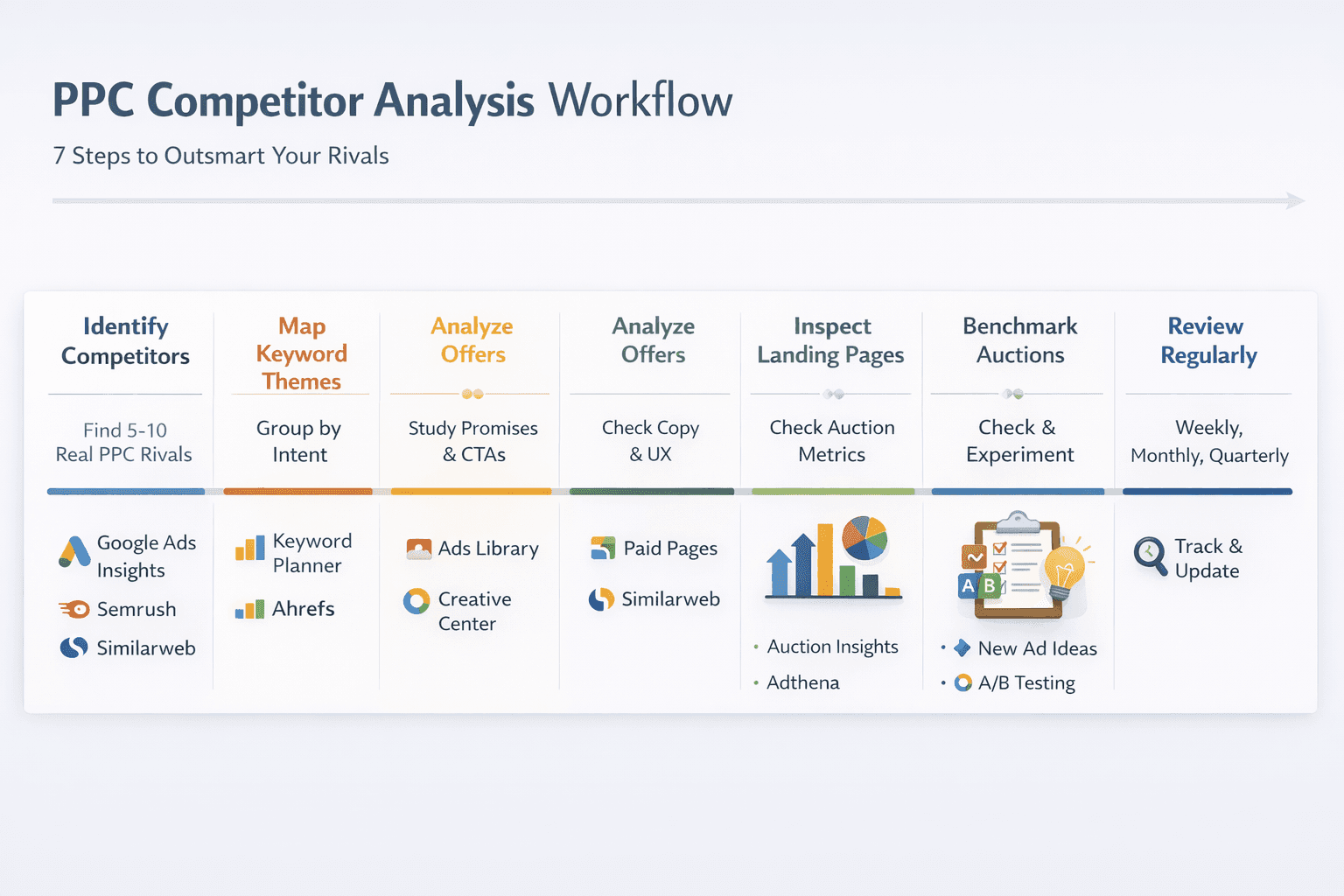
Tools are completely useless without a solid workflow. Here's a 7-step framework I've refined over years of running PPC campaigns. You can do your first pass in just 60 to 90 minutes.
Step 1: Identify Your Real PPC Competitors
Here's something that trips people up all the time: your business competitors aren't always your PPC competitors. Your PPC competitors are the brands that show up for the same searches you're targeting.
Start with your top keywords and searches. Check who appears above you consistently. Save 5 to 10 domains to analyze. Don't go overboard here-more isn't always better when you're just starting out.
Best tools for this: Google Ads Auction Insights, Google Ads Transparency Center, Semrush, Similarweb
Step 2: Map Keyword Themes (Not Just Individual Keywords)
Don't get trapped obsessing over single keywords like "CRM software." Instead, group keywords by user intent. This is where the magic happens:
- "best CRM for small business" - comparison intent
- "CRM pricing" - commercial intent
- "HubSpot alternative" - switching intent
- "free CRM" - budget-conscious intent
Best tools for this: Google Keyword Planner, Semrush, Ahrefs, Microsoft Keyword Planner
Step 3: Study Their Offers and Promises
Look for patterns in what they're promising. Are they offering free trials, demos, or consultations? Do they say "Book a call" or "Get pricing"? Are they using guarantees, case studies, or limited-time promos?
This is where you find genuine gaps in the market. If every single competitor is screaming "free demo," you might win by being clearer, faster, or more specific about what you offer.
Best tools for this: Google Ads Transparency Center, Meta Ads Library, TikTok Creative Center
Check out the 25+ call to action examples your competitors are using→
Step 4: Track Landing Page Angles (And Friction Points)
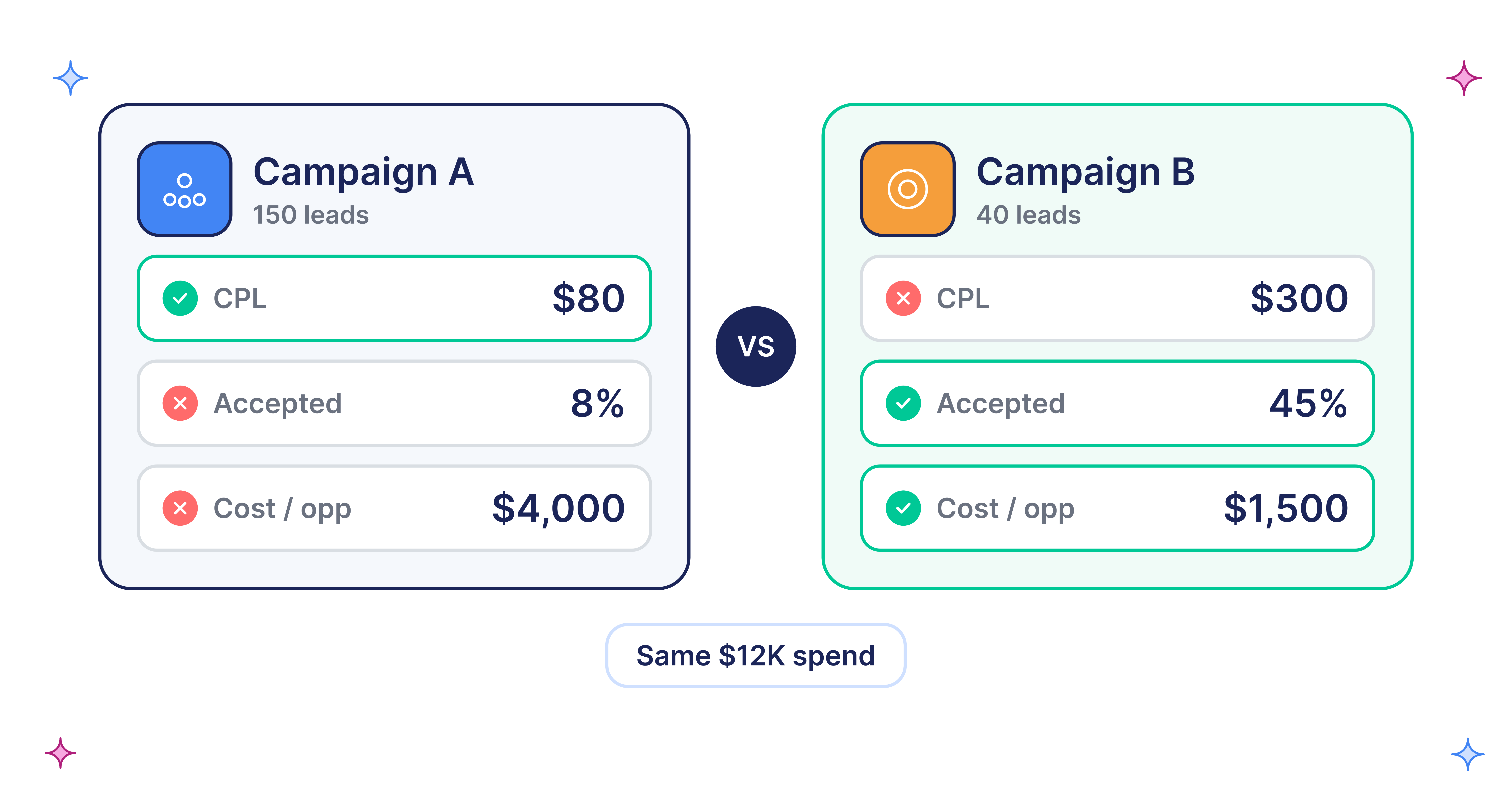
Getting clicks is only half the battle. Your landing pages decide whether you're paying $50 per lead or $500 per lead. Look closely at headline and subheadline clarity, proof elements like customer logos, reviews, and numbers, page speed and mobile experience, and form length and the number of steps required.
Best tools for this: Ahrefs Paid Pages, Semrush, Similarweb
Step 5: Benchmark Auction Pressure
If your impression share is low and a competitor's overlap rate is high, you're fighting in the same auctions every single day. Google describes Auction Insights as a way to compare your performance against other advertisers in those same auctions.
Best tools for this: Google Ads Auction Insights, Adthena (for enterprise accounts)
Step 6: Turn Insights Into 3-5 Controlled Tests
Good competitor research creates tests, not just opinions. Here are some examples of what you might test:
- A new ad group targeting "alternative" keywords
- A new offer like a "template pack" or "free teardown" instead of "book a demo"
- A landing page with stronger proof elements above the fold
- A separate campaign for high-intent keywords with tighter, more focused ad messaging
Step 7: Make It a Monthly Habit
Competitors change their offers, ads, and budgets constantly. So do auctions. Here's a simple cadence that works:
- Weekly: Scan Auction Insights and your top queries
- Monthly: Review competitor creative libraries and keyword gaps
- Quarterly: Rebuild your entire competitive map from scratch
12 PPC Competitor Analysis Tools That Actually Work
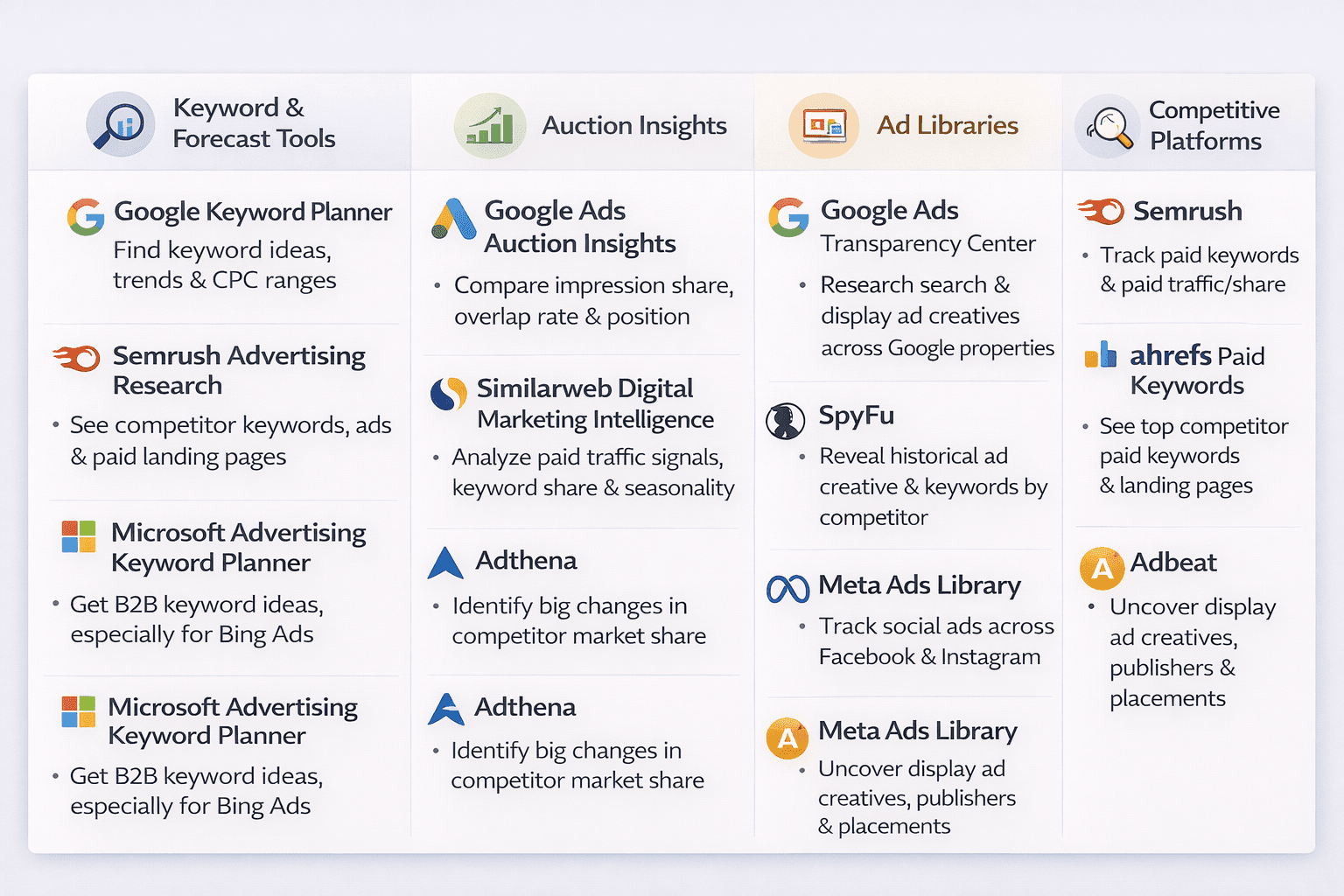
The tools here cover four buckets: keyword and forecast data, auction-level competition, ad creative libraries, and full competitive intelligence platforms. I have also included free PPC competitor research tools so you can start lean and only pay for depth when you actually need it.
- Google Keyword Planner
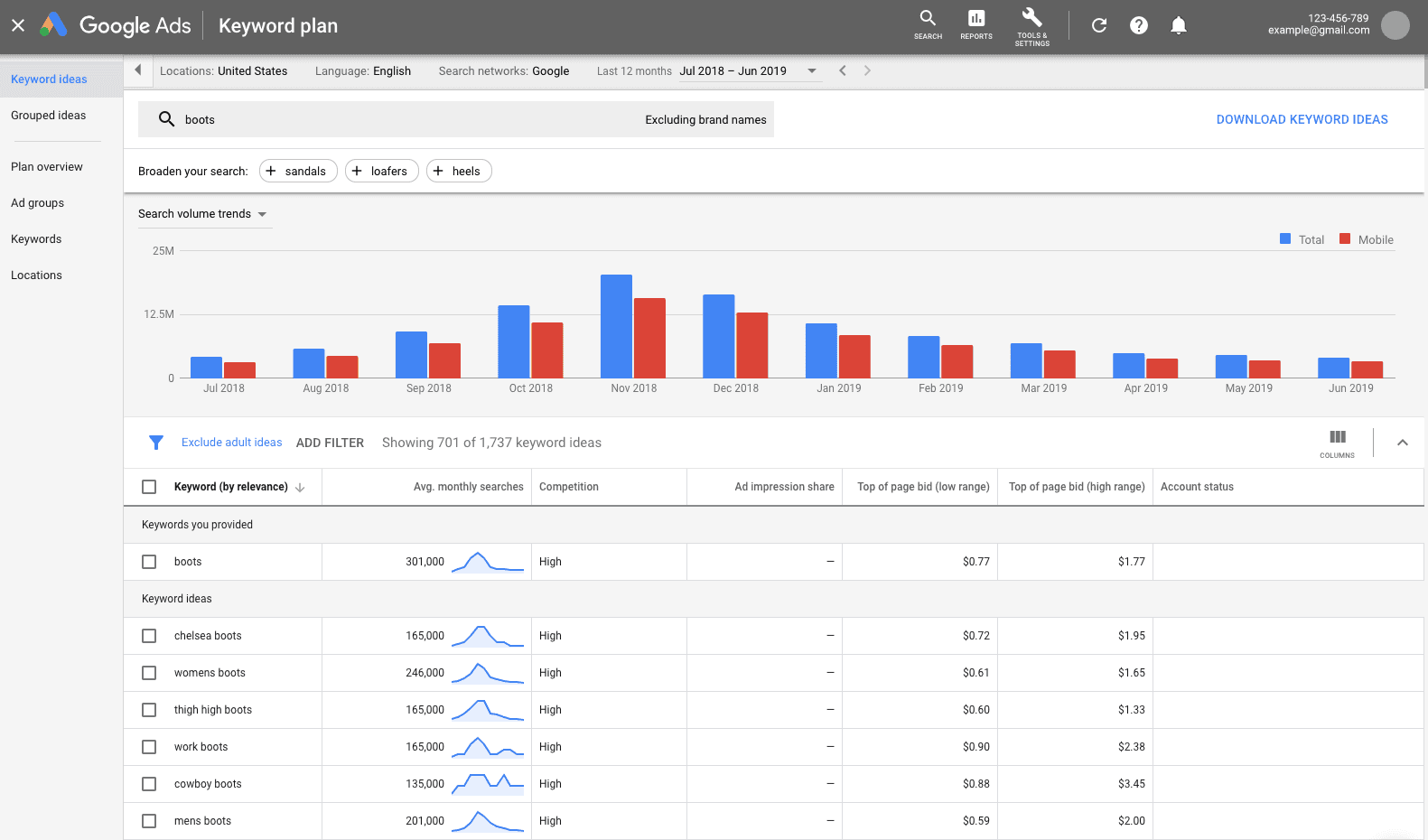
Best for: Keyword ideas, search volume estimates, and cost/forecast ranges
This is the most accessible planning tool for competitor-driven keyword discovery. Google says Keyword Planner helps you discover new keywords and see estimates for searches and the cost to target them.
How to use it fast: Open Keyword Planner in Google Ads, use the "Start with a website" option and paste a competitor landing page URL, export the keyword ideas, group them by intent (pricing, alternatives, comparison), and build a test plan with 5 to 10 new keywords per theme.
Pro tip: Don't treat Keyword Planner like it's giving you absolute truth. Use it to shape themes and forecasts, then validate everything with real search term data once your campaigns are running.
- Google Ads Auction Insights

Best for: Seeing who you compete with in the same auctions and how often
This is the most "real" competitor report because it's based on your actual auctions. Google Ads Help explains that Auction Insights lets you compare your performance with other advertisers participating in the same auctions.
What to look at: Impression share (how often you show up), overlap rate (how often you and competitors show together), and outranking share (how often you beat them).
Pro tip: Use Auction Insights as your early warning system. If a new competitor suddenly appears, something changed-maybe they launched a new product, increased their budget, or it's a seasonal push.
- Google Ads Transparency Center
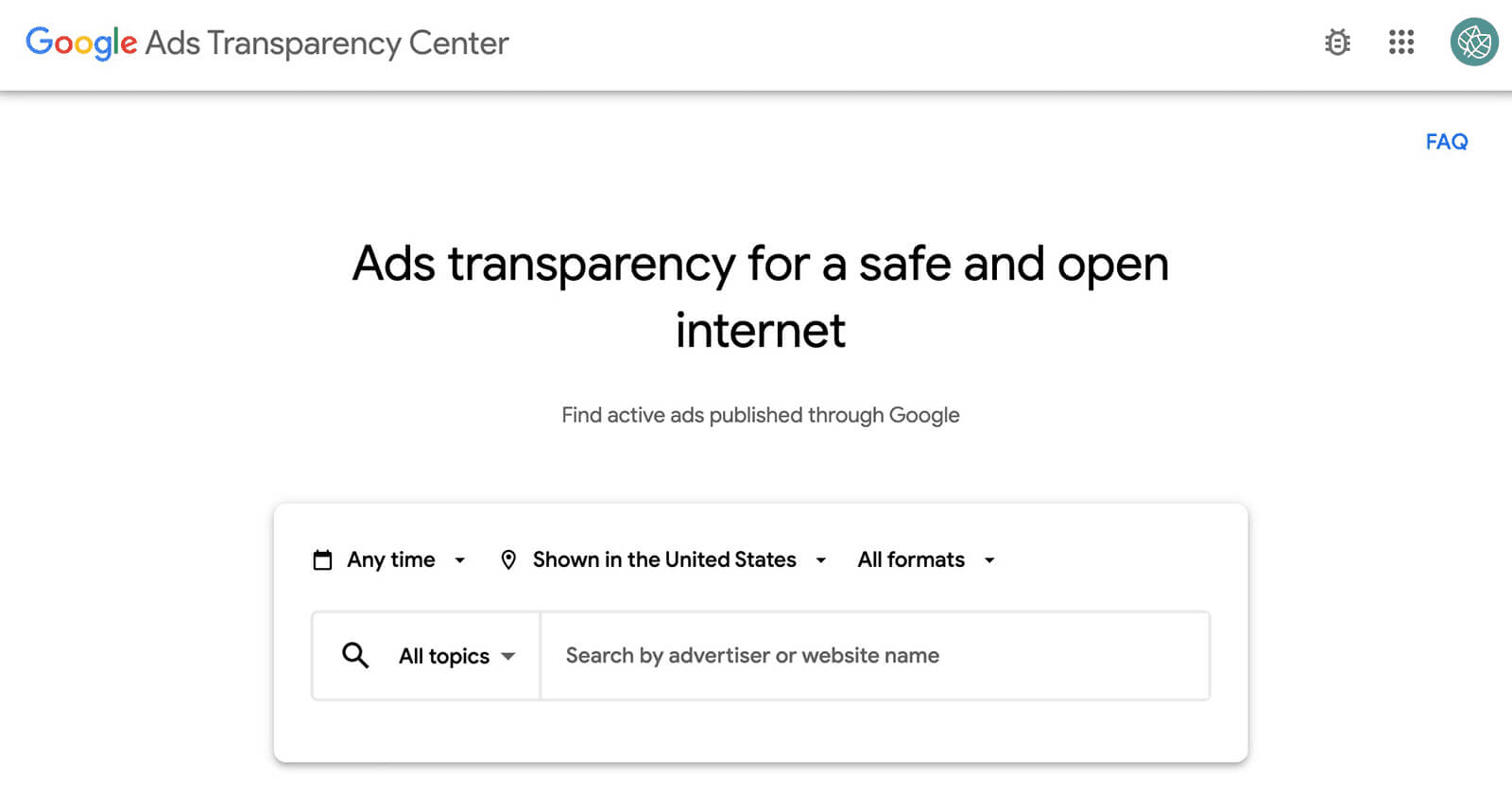
Best for: Finding competitor ad creative and messaging across Google properties
Google's Ads Transparency Center is essentially a public searchable library of ads. You can search for any competitor brand name, filter by region, and review their headlines, hooks, offer style (trial vs discount vs demo), and creative formats.
Pro tip: Track how often they rotate their messaging. Frequent changes usually mean they're actively testing-or their current ads aren't performing well and they're scrambling to fix it.
- Semrush Advertising Research

Best for: Competitor paid keywords, ad copy, and paid traffic/spend estimates
This is a well-known all-in-one tool that's particularly strong for PPC competitor research. Enter a competitor domain and you'll get their paid keywords, live ad examples, and top paid landing pages. Export the keyword list and mark each one as "steal" (high intent, strong fit), "test" (maybe worth trying), or "avoid" (wrong intent for your business).
Pro tip: Look for the boring keywords with clear buying intent, like "pricing" or "implementation." These often convert way better than flashy top-of-funnel terms.
- SpyFu

Best for: Historical competitor ad copy and keyword visibility
SpyFu is budget-friendly and known for showing competitor history. You can see their PPC keywords, ad history (what's stayed consistent over time), and keyword overlap reports to find gaps you're missing.
Pro tip: The ads that run for months are often the winners. Short-lived ads can be useful to study, but long-running ads are a strong signal that they're working.
- Ahrefs Paid Keywords + Paid Pages
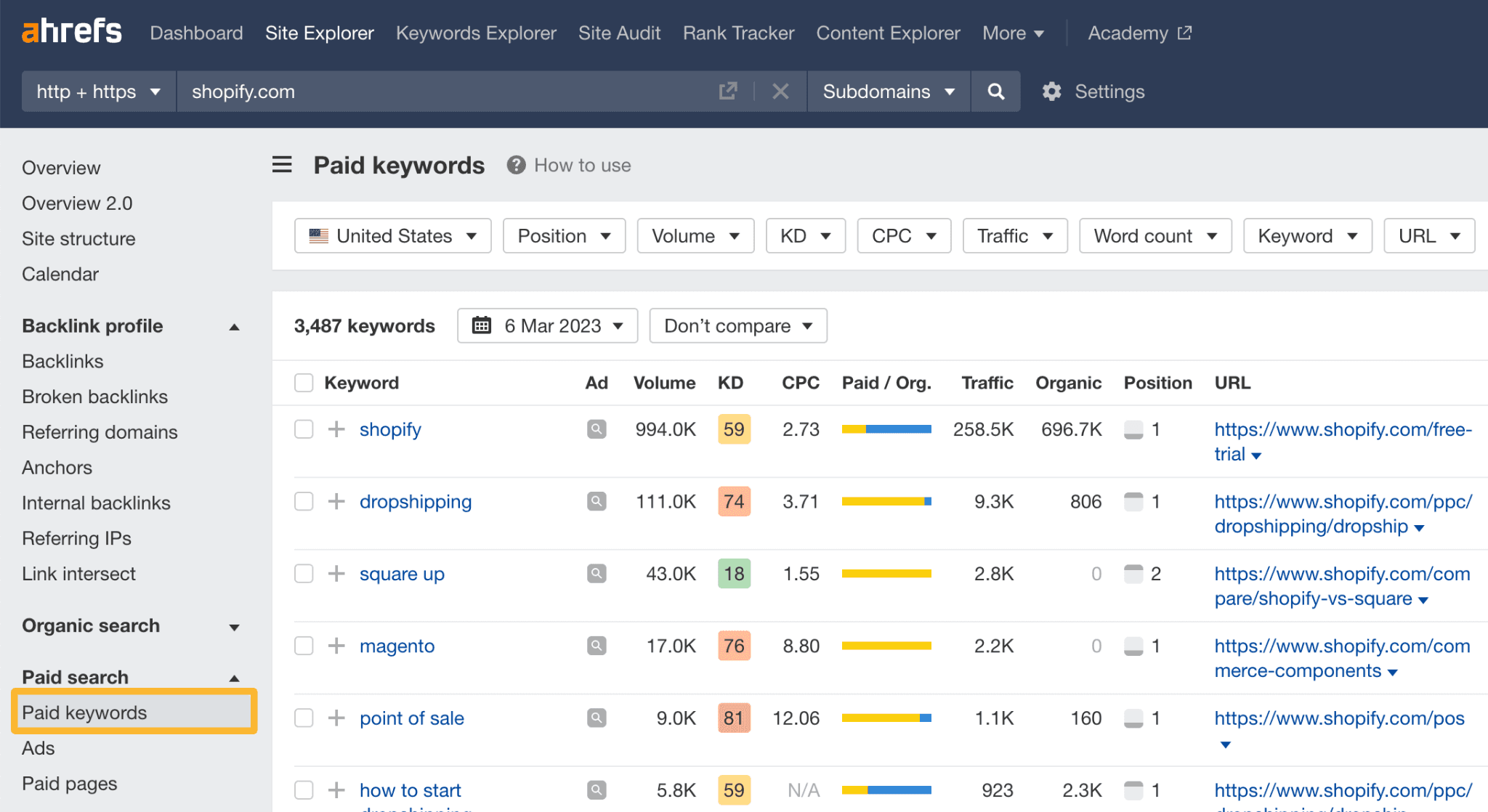
Best for: Seeing competitor paid keywords and which pages they push traffic to
Most people know Ahrefs for SEO, but it's incredibly useful for paid search intelligence too. To use Ahrefs for PPC, put a competitor domain into Site Explorer, open the Paid keywords report and export it, then check the Paid pages report to find their top landing pages. Compare their landing page structure to yours-look at the offer, proof elements, call-to-action, and page speed.
Pro tip: If their paid pages look totally different from their normal website pages, that's a huge clue. They built those pages specifically for conversion. You should do the same.
- Similarweb Digital Marketing Intelligence

Best for: Competitive benchmarks, paid search traffic signals, keyword share, and trend shifts
This tool is great for market-level context, not just keyword lists. You can see traffic spikes (seasonality or big campaign pushes), keyword clusters competitors dominate, and which landing pages they rely on most heavily.
Pro tip: Use Similarweb to answer the question: Are they winning because they're strong in one channel, or because they're dominating across multiple channels?
- Adbeat

Best for: Display ad creatives, placements, publishers, and campaign timing
Adbeat describes itself as competitive intelligence specifically for display advertisers. You can search for a competitor brand and review their top creatives, landing pages tied to those creatives, publishers and placements they use, and time periods when they push hardest.
Pro tip: Display ads often reveal the real positioning of a company because they need a strong hook to stop people from scrolling.
- Meta Ads Library
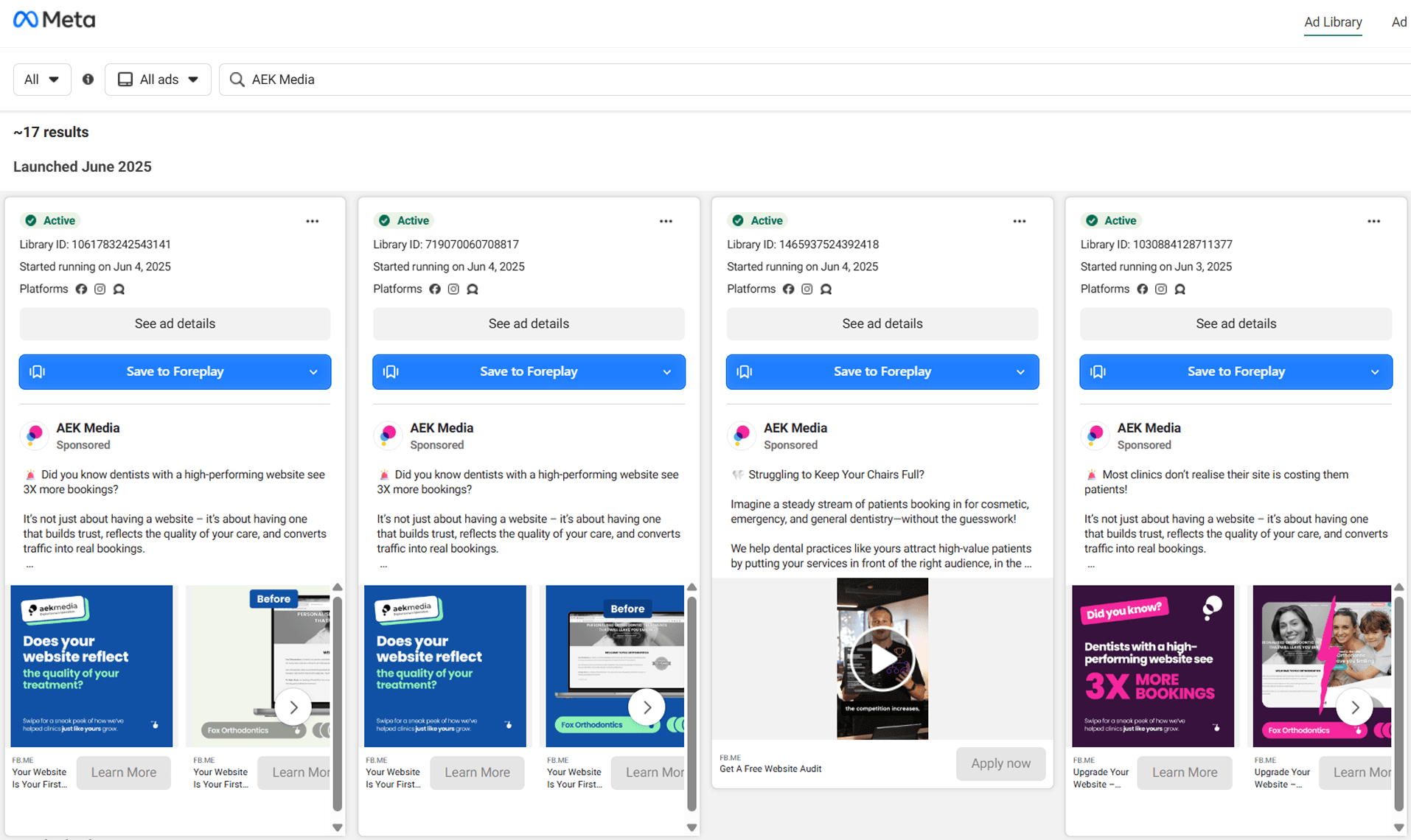
Best for: Competitor social ads, creative angles, and offer testing patterns
Meta Ad Library is a searchable database of ads across Facebook and Instagram, created for transparency. Search for a competitor brand, filter by country and platform, and look for how many ads they're running at once, how often they test new angles, and what their calls-to-action are.
Pro tip: If a competitor runs many versions of the same concept, they're probably iterating on a winner. That's a good signal to pay attention to that angle.
Google Ads vs Meta Ads? See which platform delivers better ROI?
10. TikTok Creative Center

Best for: Finding trending TikTok ad formats, hooks, and creative patterns
TikTok describes Creative Center as a place to find top-performing ads, viral videos, and trends by region and category. Choose your region and industry, review top ads, and look at the first 2 seconds (the hook), creator style versus brand style, and proof style like user-generated content, demos, or reviews.
Pro tip: Don't copy TikTok scripts word-for-word. Copy the structure: Hook, then Proof, then Offer, then Call-to-Action.
11. Microsoft Advertising Keyword Planner
Best for: Keyword ideas and planning for Microsoft Ads (often cheaper auctions)
This is a quiet advantage many teams completely ignore. Use it just like Google Keyword Planner, but compare the keyword ideas versus Google. Look for cheaper CPC opportunities and B2B keywords that perform well on Microsoft's network.
Pro tip: Many B2B brands see strong lead quality on Microsoft because of desktop and workplace usage patterns. Test it-don't just assume Google is always better.
Check out the best PPC platforms of 2026 →
- . Adthena
Best for: Large accounts needing market share visibility, competitor movements, and brand protection at scale
Adthena is enterprise-grade. It captures and analyzes search engine results page data and competitor data to guide PPC strategy. You can map your category keyword universe, track competitor coverage and messaging shifts, and use alerts to react fast when competitors change strategy.
Pro tip: This is a strong fit when you're defending a category or brand term and small changes in market share mean big revenue swings. It's not for beginners-it's for serious PPC teams with serious budgets.
Common Mistakes That Make Competitor Research Completely Useless
I want to protect you from wasting hours and walking away with nothing actionable. Here are the biggest mistakes I see:
- Only looking at ads, not landing pages. The landing page is where conversion actually happens. Don't skip this.
- Copying instead of positioning differently. If you just copy what competitors do, you're competing on the same terms. Find your unique angle.
- Studying too many competitors at once. Start with 3 to 5. More than that and you'll get overwhelmed and paralyzed.
- Ignoring intent. Traffic is not the same as buyers. Focus on keywords that signal buying intent.
- Doing it once and never updating. Auctions change constantly. Make this a regular habit, not a one-time project.
The Bottom Line
Knowing what your competitors are doing is only valuable if you act on it. Most accounts we audit at ScalixAI aren't losing to bigger budgets; they're losing to better intelligence.
The tools in this guide tell you what's happening. But to actually win against your competitors, you need to implement these insights into your strategy.
If you want to know exactly where your Google Ads account is leaving pipeline on the table, book a free audit, and we'll show you what your competitors already know about your account.
.webp)
