


Checklist Done. Account Still Leaking?
We'll find exactly what's costing you pipeline.
Share this Article



Key takeaways
Google Ads optimization is not a one-time task. It's what separates spend from revenue.
Search term reports show real intent. They're where negative keyword decisions should start.
RLSA lets you bid higher on returning visitors who are already closer to converting.
Long-tail keywords with "demo," "pricing," or "buy" signal intent — and cost less to win.
With $72K in ad spend, proper optimization generated $234K in contracted pipeline for PAM.
A Google Ads optimization checklist is often what separates campaigns that quietly waste budget from those that consistently improve and drive stronger results over time.
A common misconception about Google Ads is that your job is done once a campaign goes live. In reality, running ads alone rarely drives conversions.
What makes Google Ads work is ongoing optimization.
Nearly 65% of businesses rely on Google Ads for their PPC campaigns to reach the right audience and support key growth goals. But without optimization, even high-spend campaigns can fall short.
Google Ads optimization is not a one-time task. It’s a continuous process of improving keywords, ads, audience targeting, and performance data to lower cost per conversion (CPA), improve lead quality, and increase return on ad spend (ROAS).
At Scalix AI, we help SaaS and tech companies turn underperforming Google Ads into a consistent revenue channel by fixing strategy and execution, not just increasing spend.
What Is Google Ads Optimization?
Google Ads optimization is the ongoing process of improving your campaigns to lower cost per conversion, improve lead quality, and increase return on ad spend. It is not a one-time setup task. It is actually a continuous cycle of reviewing performance data, fixing structural problems, and making adjustments that keep your campaigns aligned with your business goals.
The difference between a campaign that improves month over month and one that plateaus is almost always whether someone is actively optimizing it or just monitoring it.
Also check out what a Googles Ads account audit looks like →
Why Google Ad Optimization is Not Optional
Creating, running, and optimizing Google Ads aren’t separate jobs. On the contrary, they all work together to drive results. Optimization is what fixes a Google Ad strategy when it's running but not producing value. Sometimes, that means rebuilding things from the ground up.
We saw this with PAM: their campaigns were live but not delivering because tracking and structure were poor. Through proper Google Ads optimization, the account was cleaned up and restructured. And with about $72K in ad spend, the optimized strategy helped generate $234K in contracted pipeline.

[table]
Without Google Ad Optimization | With Google Ad Optimization
You may get clicks but no leads | Ads align with real user intent
You may get leads but poor quality | Budget goes to what converts
You may spend money without knowing what's working | Performance improves over time
[/table]
Here's your complete guide to run Google Ads for SaaS →
A Tried-and-Tested Google Ads Optimization Checklist
Many businesses launch Google Ads but skip the optimization that drives real results. Success depends on correct setup, continuous testing, and using performance data to guide keywords, targeting, and spend. To make this simpler, we’ve outlined the core optimization actions that matter most.
Get the Right Traffic With Intent-Driven Keyword Strategy
Getting results from Google Ads starts with targeting the right searches, not more searches. An intent-driven keyword strategy helps you attract users who are actively looking for a solution while filtering out traffic that will never convert.
- Start With Keyword Research That Reflects Real Intent
PPC keyword research isn’t about volume alone. Focus on keywords that signal buying or evaluation intent, not casual interest.
What to look for:
- Keywords tied to a clear problem or solution
- Terms that suggest action, comparison, or decision-making
- Keywords that historically drive leads and revenue, not just clicks
Use Search Terms to Understand Why Users Click
Search term reports show the actual queries triggering your ads. This is where intent becomes clear.
How to use them:
- Identify search terms that lead to conversions and double down on them
- Spot irrelevant or low-intent queries and exclude them
- Find new keyword opportunities based on real user behavior
Your complete guide on how you can find high-intent keywords →
- Exclude Bad Traffic With Negative Keywords
Not every click is valuable. Excluding the wrong searches is just as important as targeting the right ones.
Actionable steps:
- Add low-quality or irrelevant queries as negative keywords
- Regularly review search terms to prevent wasted spend
- Block traffic that doesn’t align with your product, pricing, or audience
- Prioritize Long-Tail Keywords With Clear Buying Intent
- Long-tail keywords are more specific and usually signal stronger intent.
Why they matter:
- They attract users closer to conversion
- They face less competition and often cost less
- They improve lead quality and ROI
Look for terms like:
- Demo
- Pricing
- Buy
- Quote
Use RLSA to Focus Spend on High-Intent Searchers
Not every user searching on Google is discovering your brand for the first time.
Some have already visited your website, explored your product, or considered taking action. And interestingly enough these users are far more likely to convert.
Remarketing Lists for Search Ads (RLSA) is a tool that lets you adjust your search campaigns specifically for these returning users.
How RLSA works:
- A user visits your website but doesn’t convert
- They later search again for a related keyword
- Google recognizes them and applies your RLSA rules
What RLSA allows you to do:
- Bid higher to show ads more often to returning users
- Show more specific, conversion-focused ad messaging
- Restrict certain keywords to only past visitors
Why this improves performance:
- Returning users already know your brand
- They are closer to making a decision
- Your ad spend goes toward higher-intent traffic
Instead of treating all searchers the same, RLSA helps you focus on the budget where it’s most likely to drive conversions, improving efficiency without increasing spend.
Common RLSA Mistakes to Avoid
- Using one audience for everyone instead of separating users by intent
- Bidding aggressively without changing ad messaging for returning users
- Applying RLSA to low-intent keywords that won’t convert even with remarketing
- Not refreshing remarketing lists as user behavior changes
- Expecting RLSA to work without enough traffic to build meaningful audiences
Write Ads That Match Where the Buyer Is in Their Journey
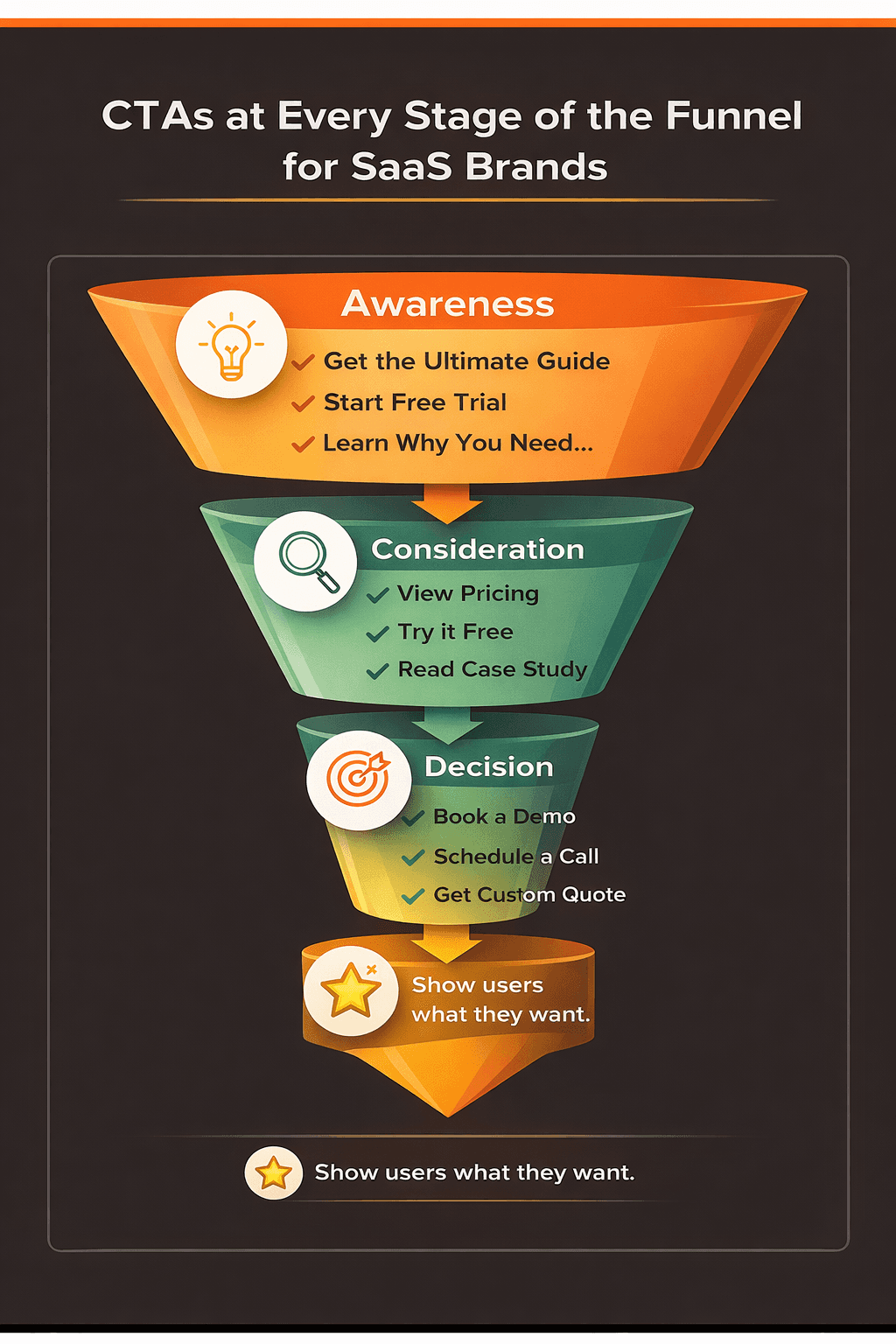
Not everyone searching on Google is ready to buy. Some people are just figuring out the problem. Others are comparing options. And only a few are ready to take action. Your ads should reflect that by not treating everyone the same.
Personalized Ad Copy
People click ads that feel relevant to them. A landing page copy optimization is likely to fail if the message is too generic. Search intent is key.
Instead of talking about everything your product does, focus on the one thing that matters to the person searching. Call out their problem, their role, or the situation they’re in. When an ad feels familiar, it earns the click.
Funnel-Specific Messaging
What you say should change based on how ready someone is.
For example, early on, users want clarity. Later, they want reassurance. You want your ad copy to meet people where they are.
Learn about Top of the Funnel Marketing →
CTA Alignment
The action you ask for matters more than you think. Asking someone to “book a demo” while they are still exploring can overwhelm them. This is where you try a much softer tone like learn more or get a free trial.
Check out 25+ best call to action examples →
Optimize Landing Pages to Turn Clicks Into Conversions
Google Ads optimization for conversion doesn’t end when someone clicks your ad.
When they click on your ad, the page they land on is called the landing page. There are so many factors on this page that determine whether that click turns into a revenue opportunity or not.
Google tracks what users do after the click.
During Google ads optimization, make sure you follow all landing page best practices as they directly impact core Google Ads metrics:
Quality Score
When your landing page matches the ad and search intent, Google sees your ad as more relevant. Higher the relevance, better the Quality Score.
Cost per click (CPC)
A higher Quality Score lowers CPC which means you pay less for the same traffic.
Cost per acquisition (CPA)
Clear messaging, focused CTAs, and low friction turn more clicks into sign-ups or demos, ultimately reducing CPA.
Return on ad spend (ROAS)
Higher conversion rates mean more revenue from the same ad budget. This improves ROAS.
Tip: For SaaS, landing pages should remove distractions, explain value fast, and guide users to one clear action. Even small changes here can significantly improve ad performance.
Use Data to Optimize Bidding, Budget, and Cost Per Lead
Google Ads optimization comes down to one thing: knowing what’s working, what’s not, and acting on it fast.
The only rule is to lead by data. It shows you everything.
Performance isn’t equal across locations, times, or devices. So by treating it that way wastes your budget.
Use Location Data to Focus Spend
Not all countries, cities, or regions convert the same.
What to check?
- Go to the Locations report
- Review conversions, CPA, and ROAS by location
Steps to take:
- Increase bids on high-converting locations
- Reduce or exclude locations that don’t convert
- Break top-performing locations into their own campaigns and allocate more budget
2. Use Time Data to Avoid Wasted Spend
People don’t convert equally throughout the day.
What to check?
- Time of day
- Day of week
- Conversion volume and CPA by time slot
Steps to take:
- Run ads during high-converting hours
- Reduce bids or pause ads during low-performance periods
- Use bid adjustments instead of full exclusions if you’re testing
- Even with smart bidding, manual time control matters when budgets are tight.
3. Use Bid Adjustments to Support What Works
Bid adjustments help you push the budget toward what’s already converting.
Filter:
- Locations
- Ad schedules
- Devices
- Demographic
Data is constantly changing. Optimization lets you review the performance, spot patterns, and adjust spend continuously.
If you’re not checking where, when, and how conversions happen, you’re guessing, and Google Ads punishes guessing.
Use Ad Extensions (and Support Them With Display Ads)
Google Ads optimization isn’t just about who sees your ads. It’s also about what they see and how easy you make it for them to take action.
Strong ad copy sets the foundation, but Google ad extensions add context, reduce friction, and give users multiple ways to convert, all before they even click.
You can add:
- Sitelinks (pricing, demo, features)
- Callouts (key benefits like “Built for SaaS” or “No long-term contracts”)
- Structured snippets (use cases or solutions)
- Pricing & promotions
- Images
- Business hours & location
- Call button
- Lead form extensions
These assets improve CTR and conversion rate by setting clear expectations and filtering out low-intent clicks.
Lead form extensions, in particular, allow you to submit your details directly from the ad. They work well for demo requests, consultations, or early-stage SaaS offers where speed and convenience matter.
How Display Ads Fit In
Display ads don’t replace Google search ads, but are there to support them.
Most SaaS buyers don’t convert on their first visit. Display ads help you stay visible while prospects compare options or take time to decide. When users later see your search ads again, that familiarity increases trust and engagement.
Together these actions improve:
- Click-through rate (CTR)
- Quality Score
- Cost per click (CPC)
- Cost per acquisition (CPA)
- Return on ad spend (ROAS)
Unlock strategies to improve your CTR!
Your Daily and Weekly Google Ads Optimization Checklist
The checklist above covers the strategic layer. And this one is your daily and weekly Google Ads optimization checklist designed to keep your accounts healthy and prevent spend from leaking silently.
Daily Google Ads Optimization Checklist
- Search term report review: Sift through queries that triggered your ads the previous day. Move irrelevant searches to your negative keyword list immediately. Every day you don't do this, the budget is funding clicks that will never convert.
- Conversion tracking verification: Confirm your tags fired correctly. Broken conversion tracking is the most common reason well-structured campaigns underperform. The algorithm is learning from bad data, and nobody notices until CPL has already climbed.
- Budget pacing: Check whether campaigns are on track to spend their daily budget without hitting the cap too early. Early exhaustion means your ads go dark during the highest-intent search windows later in the day.
- Ad and sitelink disapprovals: Catch disapproved ads or extensions before they affect delivery. An unapproved ad running silently without being flagged costs you impression share you may not notice is missing.
- Sudden performance fluctuations: If spend, conversions, or CTR shifts significantly overnight, something changed. It could be a competitor, a tracking issue, a landing page problem, or a bidding glitch. Investigate before the issue compounds across a full day of spend.
Weekly Google Ads Optimization Checklist
- A/B test status: Check whether running tests have reached statistical significance. Tests that run too long without a decision are a missed opportunity. Tests that are called too early produce false conclusions that hurt downstream performance.
- Quality Score spot check: Review keywords with a Quality Score below 6. A drop usually means your landing page relevance has drifted, a competitor has raised the expected CTR benchmark, or your ad copy is no longer aligned to the search intent.
- Audience signals and customer list upload: Refresh audience lists and upload updated customer data. Stale audience signals cause bidding systems to make decisions based on who your customers were three months ago, not who they are now.
- Offline conversion import: For B2B accounts, verify that CRM deal data is syncing correctly back into Google Ads. Without this, Smart Bidding optimises toward surface conversions rather than the closed revenue your business actually cares about.
- Placement review on Display and YouTube: Pull the placement report and exclude irrelevant sites and apps absorbing budget. Display placements accumulate waste faster than most advertisers realise, and the report is rarely reviewed as often as it should be.
- Insights tab review: Check the Insights tab for search trend shifts, audience changes, and auction fluctuations. This is qualitative data that the numbers alone won't surface; it tells you why performance is moving, not just that it is.
- Overall account performance snapshot: Review spend, conversions, revenue, and CPL week over week. Not to make immediate changes, but to identify patterns early enough to act before they become structural problems.
- Billing and account verification status: Check that billing is active and no verification issues are pending. An account suspension from a billing error is entirely preventable and entirely common among teams that never look at the admin layer.
Automated Google Ads Optimization Workflows
Manual optimization is essential, but it doesn't scale. The accounts that maintain consistent performance as they grow are the ones that automate the routine layer so the human attention stays on decisions that actually require judgment.
Here are four Google Ads optimization workflows worth setting up:
- Automated rules for keyword management
Google Ads has built-in automated rules that act on conditions you set. Use them to pause keywords that have spent above a threshold with zero conversions, nudge bids up or down based on CPA performance, and pause campaigns on a specific date without needing to log in manually. These rules don't replace human oversight; they prevent the most common forms of passive waste that accumulate when nobody is watching.
- Performance alert scripts
Google Ads scripts can monitor your account and send email alerts when something breaks or shifts unexpectedly. Some examples include a keyword crossing a spend limit, an ad group delivering zero impressions, or a broken destination URL sending traffic to a 404 page. Without these, problems sit undetected until the weekly review. With them, you know within hours.
- CRM-to-Google Ads offline conversion integration
This is the most high-leverage automation available for B2B accounts. When a deal moves to a new stage in your CRM, whether that's Salesforce, HubSpot, or Pipedrive, this integration automatically sends that conversion signal back to Google Ads as an offline conversion event. This closes the attribution gap between ad clicks and closed revenue, giving Smart Bidding the signal it needs to optimise toward buyers who actually convert, not just buyers who fill out forms.
What a closed-loop, clean attribution setup looks like in 2026 →
- Customer list syncing
As your customer base grows, your exclusion and lookalike lists should grow with it. Automating the sync between your CRM and Google Ads audience lists means your campaigns are always working from current data, excluding existing customers from acquisition campaigns and finding new prospects who match your best buyers.
The goal of automation is not to remove human judgment from the account. It is to free up that judgment for the decisions that move performance, while the routine layer runs without requiring manual attention every day.
Common Google Ads Optimization Mistakes
Knowing what to do is only half the job. These are the mistakes that quietly undo good optimization work, and they show up consistently across accounts at every spend level.
- Optimizing too early. Changing bids, pausing keywords, or switching bidding strategies before enough conversion data exists resets the learning period and produces unstable performance. The account needs a minimum of 30 conversions in 30 days before automated bidding has enough signal to act reliably. Making decisions before that threshold is met produces inconsistency, not improvement.
- Accepting Google's auto-applied recommendations without review. Google's recommendations are optimised for reach and spend, not your CAC target. Broad match expansion, target impression share bidding, and budget increase suggestions are among the most commonly auto-applied settings that quietly damage B2B account efficiency. Review every recommendation manually before accepting anything.
- Treating conversion tracking as a one-time setup. Conversion tags break. Landing pages get rebuilt. CRM integrations drift. Most teams set up tracking once and assume it's still working correctly six months later. It often isn't. Verifying that your conversion events are firing accurately should be part of every weekly check — not an annual audit.
- Optimizing on blended metrics. Reviewing account-level CPL without separating branded from non-branded performance hides structural problems. Branded campaigns almost always convert at lower cost, which inflates the blended average and makes non-branded performance look better than it is. Always segment before concluding.
- Ignoring the landing page. Campaign structure and keyword strategy can both be correct, while conversion rate is still poor because the landing page doesn't match the search intent. Optimizing the ad side of the account without reviewing landing page alignment is the single most common reason accounts plateau despite ongoing management effort.
- Making too many changes at once. Changing bid strategy, ad copy, and keyword match types in the same week makes it impossible to know which change produced which outcome. Optimize one variable at a time with enough time between changes to see the effect clearly.
The Bottom Line
A Google Ads optimization checklist isn’t a shortcut or a hack. Look at it as an ongoing process that you follow to track search intent.
The data shows you how real buyers actually move from click to conversion.
When keywords match intent, ads speak to the right stage of the funnel, landing pages remove friction, and budgets follow performance, Google Ads stops feeling unpredictable and starts feeling controllable.
This is the approach we take at Scalix AI. As a Google Ads management service, we help SaaS and tech teams move beyond “ads are running” to ads that are optimized, measurable, and tied to real pipeline and revenue.


